Shop
- 4.4
- Rating
- 50.00M
- Installs
- Free
- Price

 Analysis by App-foxy
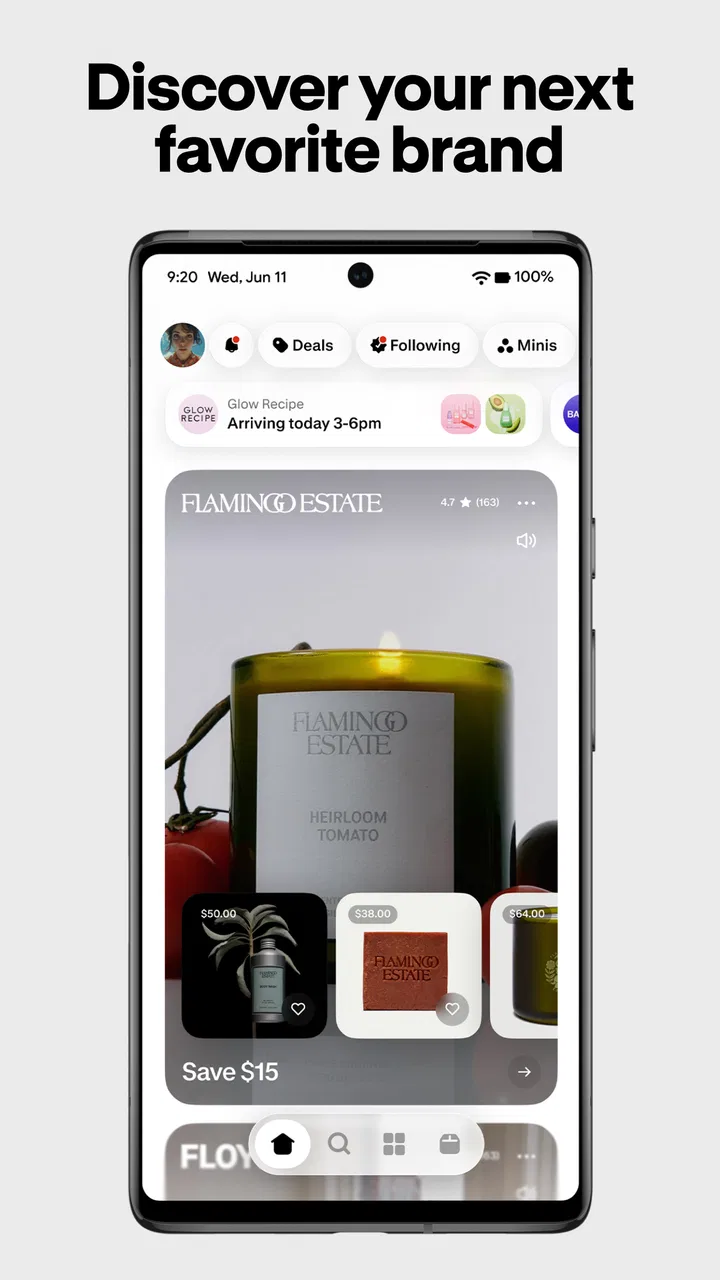
Shopping through a phone can be convenient, but it can also become a messy mix of browser tabs, saved products, order emails, and accounts. Shop: All your favorite brands takes a different approach. It is a free shopping app from Shopify Inc. that brings product discovery, purchases, and Shop Cash into one place. After spending time with it, I see the strongest appeal in its simple path from finding something interesting to returning to it later without rebuilding the search from scratch.
I would recommend it most to people who already buy from online brands and want a more organized way to browse them. It is also useful if you like discovering products from smaller or familiar stores without visiting every shop separately. At the same time, it is not a universal replacement for every retailer’s own app. The experience depends on whether the brands and products you care about fit naturally into Shop’s ecosystem, so expectations matter from the first screen.
What the app feels like when you first open it
The app belongs to the shopping category, but it does not feel like a single-store catalog. Instead, the experience is built around finding products and brands in one central shopping space. The store summary focuses on earning and spending Shop Cash, increasing your balance, and finding products from brands people enjoy. In practice, that makes Shop feel closer to a discovery and shopping companion than a traditional department-store app.
In-Depth Coverage of Shop
The interface is most useful when you have an intention but not yet a precise item in mind. You might know that you want skincare, clothing, home goods, or a gift, but not which store deserves your attention. Shop can help narrow that broad idea into products and brands worth investigating. If you already know the exact item and retailer, the retailer’s own app or a normal web search may get you there faster.
One thing I appreciate is that the app does not require me to treat every shopping session as a major project. I can browse for a few minutes, notice a product, and decide whether it is worth returning to later. That low-pressure rhythm suits casual shopping, especially when I am comparing ideas rather than checking out immediately.
The audience is broad. The content rating is Everyone, and the app runs on Android devices using version 8.0 or later. Its reach is also substantial: Shop has passed 50 million installs, while its average rating sits at 4.5 from a large body of user feedback. Those figures suggest a mature service with plenty of real-world use, although popularity does not remove the need to check whether it matches your own shopping habits.
What Shop Cash changes about the experience
Shop Cash is one of the app’s defining ideas. Rather than treating the app only as a place to search and buy, it gives shopping activity another layer through a balance that can be earned and spent. That can make returning to Shop feel more purposeful, particularly when you are already planning a purchase that fits the available options.
My advice is to think of Shop Cash as a useful extra, not the reason to buy something. A balance can make a suitable purchase more appealing, but it should not push you toward a product you would not otherwise choose. The best habit is to decide what you need first, then see whether Shop Cash improves that transaction. This keeps the reward from turning into a reason for unnecessary spending.
A less obvious benefit is that the balance can act as a small prompt to revisit the app with a clear goal. Instead of opening Shop and scrolling without direction, I can check what I am looking for, consider whether the balance is relevant, and then stop once the decision is made. That simple boundary helps keep shopping from becoming endless browsing.
Setting up a useful starting point
The first setup should be approached as a way to make the app relevant, not as a race to finish every available screen. I would begin by signing in with the account I expect to use for shopping, then take a moment to understand where product discovery, purchases, and Shop Cash are presented. The exact value of the app comes from having a consistent shopping identity, so switching between unrelated accounts can make the experience feel less coherent.
Before exploring widely, I would choose a familiar product category or a brand I already trust. This gives the app a practical test. If I search for something I genuinely might buy, I can judge the quality of the results, the amount of information shown, and how easy it is to move from discovery toward a purchase. Starting with a real need is more informative than browsing random recommendations.
I also recommend keeping the first session deliberately small. Look at a handful of products, open the details that matter, and notice how you return to the results. This reveals whether Shop suits your personal way of comparing items. Some people want a quick decision; others need to move between several products and stores. The app is more convincing when it reduces that comparison work rather than adding another place to check.
One practical setup tip is to separate inspiration from buying intent. If you are only collecting ideas, browse without assuming that every product deserves immediate action. If you are shopping for a specific event or replacement item, use a tighter search and compare the final candidates carefully. Shop supports both moods, but the results are easier to judge when you know which one you are in.
Reaching the first meaningful success
The first successful action should not simply be opening the app or scrolling through a recommendation. For me, it is finding a product from a brand I would realistically consider, understanding enough about it to make a sensible decision, and then either completing the purchase or saving the information for a later return. That sequence shows whether Shop is actually reducing effort.
A realistic example would be replacing a household item. I might open Shop, search for the type of product, compare several listings, and look at the brand behind each one. If one option fits my needs, I can continue toward buying it. If I am still unsure, I can leave the session with a short list of candidates instead of several browser tabs scattered across different stores.
You May Also Like

 Lords Mobile: Kingdom Wars
Lords Mobile Is a Kingdom-Building Routine, Not a Quick Match
A case-by-case verdict on the building, battles, device demands, and social commitments that make Lords Mobile rewarding for some players and exhausting for others.

 PDF Scanner app - TapScanner
TapScanner Makes Paperwork Easier to Capture, Check, and Share
TapScanner makes scanning with a phone feel less like a rescue operation and more like a dependable step in getting work done. Its capture tools are useful, though not flawless.

 Block Blast!
Block Blast! Shows How Much a Puzzle Game Can Leave Out
A quiet grid game shows why puzzle players increasingly value instant clarity, repeatable skill and low-pressure play—and where the genre still needs to catch up.

 Family Space
Family Space Review: A Shared Routine That Makes Family Life Easier
A parenting app earns its place not by adding more noise, but by making everyday coordination easier. Family Space gets that balance mostly right.

 1Weather Forecasts & Radar
1Weather Forecasts & Radar Makes the Daily Check Worthwhile
A good forecast does more than predict rain. This week's pick turns changing conditions into a clear, practical reason to check before you step outside.

 Clash of Clans
Clash of Clans Makes Patience Part of the Strategy
A village builder with a sharp tactical core, Clash of Clans turns patience into momentum and each raid into a small, satisfying act of judgment.
More From Our News Desk
View All News


For a gift, the process is slightly different. I would begin with a broad idea, such as something for a person who enjoys cooking or design, and use the app to discover brands rather than forcing an exact search too early. Once I find a promising product, I would check the details and decide whether the brand feels trustworthy enough to explore further. This is where Shop is more interesting than a plain search engine: it can help me move from a vague intention to a more focused shortlist.
Shop Cash can become part of that first success, but I would only apply it after deciding that the purchase makes sense. Check the balance and the available way to use it at the point where it is relevant, rather than changing your shopping plan around the reward. The strongest workflow is need first, product second, Shop Cash third.
Another useful workflow is to use Shop at two different times. During the first session, discover and compare. Later, return when you are ready to act. This avoids making an impulse decision simply because a product looked appealing in the moment. It also lets you judge whether the app helps you resume a shopping task without starting over.
Where first-time users can get confused
The biggest possible misunderstanding is assuming that Shop works exactly like one giant retailer. It does not replace the identity, product selection, or buying process of every brand. A product may be easy to discover in Shop, while the details that matter for your decision still require careful attention to the individual store and item.
I would not treat a product card as the entire purchasing decision. Look beyond the attractive image and basic description. Consider the brand, the product variations, the final cost shown during the buying process, and whether the item really fits your needs. Shop can make discovery faster, but it cannot make a poor product choice sensible.
Shop Cash is another area where expectations should stay realistic. A balance is not the same as a blanket discount on everything in the app. Its usefulness depends on how and where it can be spent. I would always check the applicable details at the moment I plan to use it, rather than assuming that every product or store will treat it identically.
Some users may also expect Shop to be the best place for highly technical comparison. If I am buying electronics, equipment, or anything where specifications are the main decision, I may prefer a specialist retailer or a manufacturer’s site for the final research. Shop can help me discover a brand or product, but a focused alternative may provide deeper technical context.
Another source of friction is the difference between browsing and managing an existing order. If your main goal is tracking a purchase, handling a return, or resolving a store-specific issue, the retailer’s own support channel may be more direct. Shop is valuable as a central shopping layer, but the original seller remains important when the question concerns a particular order or policy.
How it compares with ordinary shopping alternatives
Compared with shopping through a mobile browser, Shop feels more focused because the purpose is clear from the start. A browser is more flexible and can reach almost any site, but that flexibility often means juggling tabs, logins, and separate shopping journeys. Shop is better when you want a dedicated place to discover products and revisit shopping activity.
Compared with a single retailer’s app, Shop offers broader discovery. A retailer’s app usually wins when you already know the store, want its complete catalog, or need its specific loyalty and support tools. Shop wins when you are open to several brands and want to move between them without beginning from zero each time.
Compared with a general marketplace, Shop has a different feel. A marketplace may be stronger for rapid price comparison across many sellers, while Shop’s appeal is its brand-centered discovery and its connection with Shop Cash. If the lowest available price is your only priority, a price-comparison tool may be the better first stop. If you care about finding brands and building a more organized shopping routine, Shop is more appealing.
That distinction matters because no single shopping app is ideal for every purchase. I would use Shop for discovery, familiar online brands, and purchases where Shop Cash genuinely helps. I would switch to a specialist site for detailed product research, a retailer’s own app for store-specific account tasks, and a comparison service when price checking is the central job.
Small habits that make the app more useful
My first tip is to search with a real shopping question rather than a broad impulse. “A replacement for this item” or “a gift for this type of person” gives the session a purpose. You will notice more quickly whether the recommendations are helping, and you are less likely to confuse attractive browsing with useful progress.
My second tip is to use brand discovery as a research stage. When a product catches your attention, look at the brand before deciding. This can reveal whether the item belongs to a store you would actually return to. The value is not only in the individual product; it is also in finding reliable places to shop again.
My third tip is to delay the reward decision until the product decision is settled. Shop Cash is most helpful as a finishing tool. If you start with the reward and work backward, you may spend time on products that are merely eligible rather than genuinely suitable. This is a small change, but it makes the app feel more like a shopping assistant and less like a prompt to spend.
My fourth tip is to keep a clear stopping point. Once I have found a suitable item, compared the important details, and decided what to do next, I close the session. The app is designed to make discovery easy, which is useful, but easy discovery can also become aimless scrolling. A defined goal protects the convenience from becoming distraction.
Who should use Shop, and who should skip it
I think Shop is a strong choice for people who buy online from several brands and want one familiar shopping environment. It is especially suitable for first-time users who feel overwhelmed by scattered store experiences, because the central idea is easy to understand: discover products, explore brands, and use Shop Cash when it fits the purchase.
It is also a good match for casual shoppers who enjoy discovering products but still want a path toward a real transaction. The app gives that browsing habit more structure than a collection of open browser tabs. People who shop for gifts may find the brand discovery angle particularly useful, since starting with a person or interest can be easier than guessing a specific product.
I would be more cautious if you only shop from one retailer, need deep technical specifications, or mainly want the absolute lowest price. In those situations, the retailer’s own app, a specialist store, or a comparison service may be more efficient. I would also skip making Shop my primary tool if order support and returns are the main reason I am opening an app; the original seller is often the more direct place for those tasks.
What to do after the first purchase
Once the first shopping session feels successful, the next step is to decide how Shop fits into your normal routine. I would not move every purchase into it automatically. Instead, use it for the situations where its central discovery experience or Shop Cash provides a clear advantage. That keeps the app useful without making it another obligation to maintain.
You can also test whether returning to a brand through Shop is more convenient than searching for that brand again in a browser. If it saves time and keeps your shopping organized, that is a meaningful benefit. If you still prefer the retailer’s own app for most tasks, Shop can remain a discovery tool rather than replacing your existing setup.
The current version is 2.234.0, and the app was released on September 26, 2019. Those details place it in the category of an established shopping service rather than a brand-new experiment. Its free price makes trying it low-risk, provided you treat the first session as a practical test: find one relevant product, understand the Shop Cash flow, and decide whether the app makes your own shopping easier.
After using it with that mindset, my opinion is positive but measured. Shop is at its best when it shortens the distance between “I might need something” and “I know where to look next.” It is not a replacement for careful product research or every retailer’s support system, but it can bring discovery, brands, and Shop Cash into a more manageable routine.
For a first-time user, I would start with one genuine shopping need, explore a small number of relevant products, and resist spending simply because a reward is available. If the app helps you find a suitable item and return to the right brand without the usual clutter, it has earned a place on your phone. If your shopping is highly specialized or focused on one store, another option may serve you better. That balance is exactly why I see Shop: All your favorite brands as a useful companion rather than an all-purpose shopping replacement.
FAQs for Shop
01What features does the Shop app offer?
The Shop app provides a seamless shopping experience by consolidating all your favorite brands in one place. It offers features such as order tracking, personalized recommendations, secure payment options, and a curated selection of popular brands. Additionally, it provides real-time updates on shipping and delivery, ensuring you are always informed.
02Is the Shop app free to use?
Yes, the Shop app is free to download and use. However, while the app itself does not charge for its services, the purchases you make through the app will, of course, be charged by the respective sellers. Keep an eye out for any in-app promotions or discounts offered by partnered brands.
03How secure is my payment information on the Shop app?
The Shop app prioritizes user security by employing advanced encryption technology to protect your payment information. It uses secure servers and complies with industry standards to ensure that all transactions are safe. Additionally, the app offers options for secure payment methods, such as credit card and digital wallets.
04Can I track my orders using the Shop app?
Absolutely! One of the standout features of the Shop app is its robust order tracking system. Once your purchase is made, the app provides real-time updates on the status of your order, including shipping notifications and estimated delivery times, so you're always in the loop.
05Does the Shop app support multiple languages and currencies?
Yes, the Shop app supports multiple languages and currencies to cater to a global audience. Users can select their preferred language and currency within the app settings. This flexibility makes it easy for international users to shop from their favorite brands without any hassle.
Pros
- Wide variety of brands available.
- User-friendly interface for easy navigation.
- Personalized recommendations enhance shopping.
- Secure payment options ensure safety.
- Regular updates with new features.
Cons
- Limited customer support availability.
- Occasional app crashes reported.
- Some items may have delayed shipping.
- Push notifications can be overwhelming.
- Requires a stable internet connection.

Shop
Gallery